 MirrorAct
 Type, don’t thumb
Write long messages, emails and forms on a real keyboard – in any app on your iPhone.
In development · join the waitlist
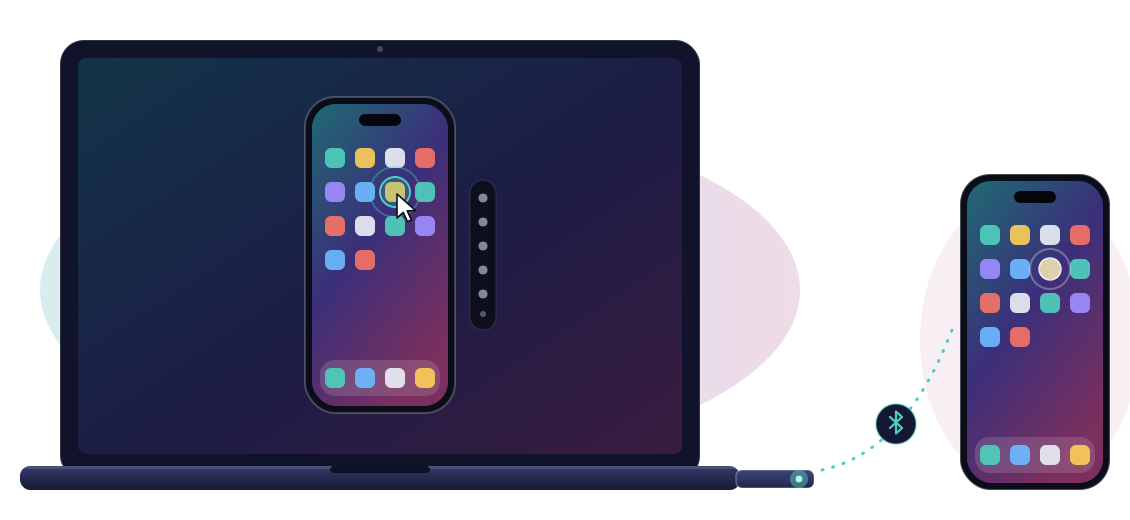
MirrorAct Plug is a small plug for your Mac or Windows PC. Plug it in, connect your iPhone once – and it appears on your screen, where you use it with mouse and keyboard. No tech know-how needed.
Set up
As easy as connecting headphones.
Step 1
Download it and install it like any other app – on a Mac or a Windows PC.
Step 2
Into a free USB port on your computer. That’s it.
Step 3
Once, like headphones – the app shows you every step. From then on, your iPhone is on your screen whenever the Plug is in.
For you
For everyone who’d rather use a mouse, a keyboard and a big screen – whatever the reason.
Write long messages, emails and forms on a real keyboard – in any app on your iPhone.
Your iPhone at a comfortable size, with a mouse instead of tiny touch targets – easier on eyes and hands.
Put your iPhone on the projector and operate it from your laptop – for classes, trainings and demos.
Make clear step-by-step videos and screenshots for parents, customers or colleagues.
Reply, check and scroll without reaching for your phone – and without losing your focus.
Use phone-only apps on the screen and keyboard you already work with.
How it works
Your iPhone already knows how to work with a mouse and keyboard. The Plug is both, and the app moves it to wherever you click. That’s the whole trick.
Fair and square
MirrorAct stays free and open source. The Plug will be a paid product: the device plus the app that drives it. You’ll know the price before you can order – and joining the waitlist is free and commits you to nothing.
Leave your email and confirm it with one click. We’ll write when the first Plugs are ready – and maybe once before, to ask what matters to you. Nothing else.
We’ve sent you an email. Click the link in it to confirm your spot – nothing there? Have a look in your spam folder.
FAQ
No. If you can install an app and connect headphones, you can set up the Plug. The app walks you through every step.
No. You switch on one setting and connect the Plug once – the app shows you where to tap.
iPhones and iPads with a current iOS, and Macs and Windows PCs with a free USB port. We’ll publish the exact requirements before orders open.
It’s on our list. Tick “Android” on the form if you want it – that tells us how many of you do.
We’ll announce price and date before orders open. The first batch will be small, and people on the waitlist hear about it first.
The free app is made for developers: to control an iPhone, it needs developer software and a few technical steps. The Plug skips all of that and works on Windows, too.
We use it only to tell you about MirrorAct Plug. You confirm it once by email, every email has a link to unsubscribe, and we delete it when you do – or when we close the waitlist. Details are in the privacy policy.